To watch our extensive playlist of channels and VODs directly on your Kodi app, it’s very simple; we will show you how to do it in 2 minutes!
To get started, order your m3u file link here. If you’re unsure and want to take a 48-hour test to try our service, go here.
You have your m3u link in hand, perfect! Let’s start our tutorial!
Launch your Kodi application and click on TV as shown in the photo below:

A message will appear asking you to install the PVR IPTV Simple Client ADDON, click OK:

Next, click on the « ENTER ADD-ON BROWSER » button to display the list of Addons:

A list of Addons will appear on your screen, scroll down a bit and look for ‘PVR IPTV Simple Client’ and click on it:

The Addon page will appear on your screen, click on ENABLE to activate the addon:

Once our addon is activated, click on Configure:

On the settings page, choose under LOCATION = remote Path (internet address); this option will allow you to enter the link to your m3u file (it is recommended to choose Remote Path and not Local Path to receive playlist updates automatically):

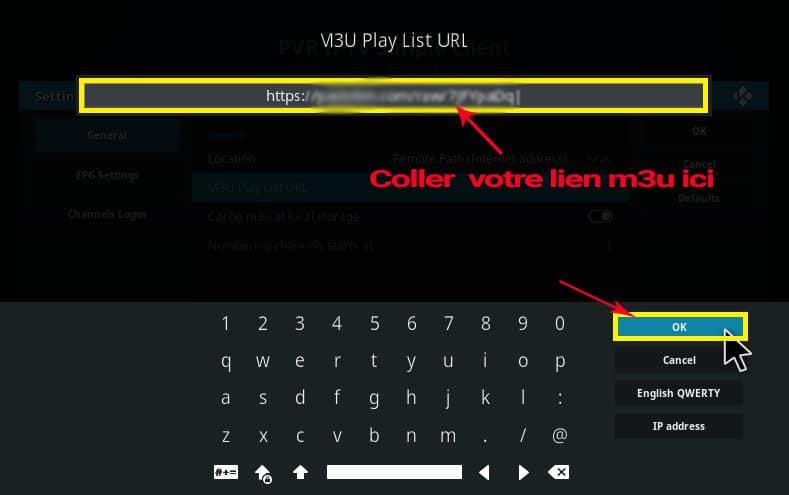
Then, click on « m3u Playlist URL » to enter the link to your m3u file:
Paste or enter your m3u link:
After that, simply restart Kodi and launch PVR to enjoy your subscription.
Note that this method will not provide the EPG and channel logos; to have this feature, you need to have an XML TV link or install the Xtream-Codes IPTV Addon. More information here.