To enjoy your IPTV subscription on the SSiptv app, simply follow the steps below:
Prerequisites: m3u playlist link (m3u URL) + the SSIPTV app installed on your Samsung, LG, or Sony Smart TV, etc., or Android TV
Steps to install m3u playlist on SSIPTV:
1- Install the SSiptv app
2- Access the SSiptv app on your Smart TV or Android BOX and retrieve the app code, as shown in the photo below:

3- Go to the SSIPTV Playlist Editor site ==> the SSiptv app playlist editor
4- Enter the code in the field and then click on ADD DEVICE (see photo below):
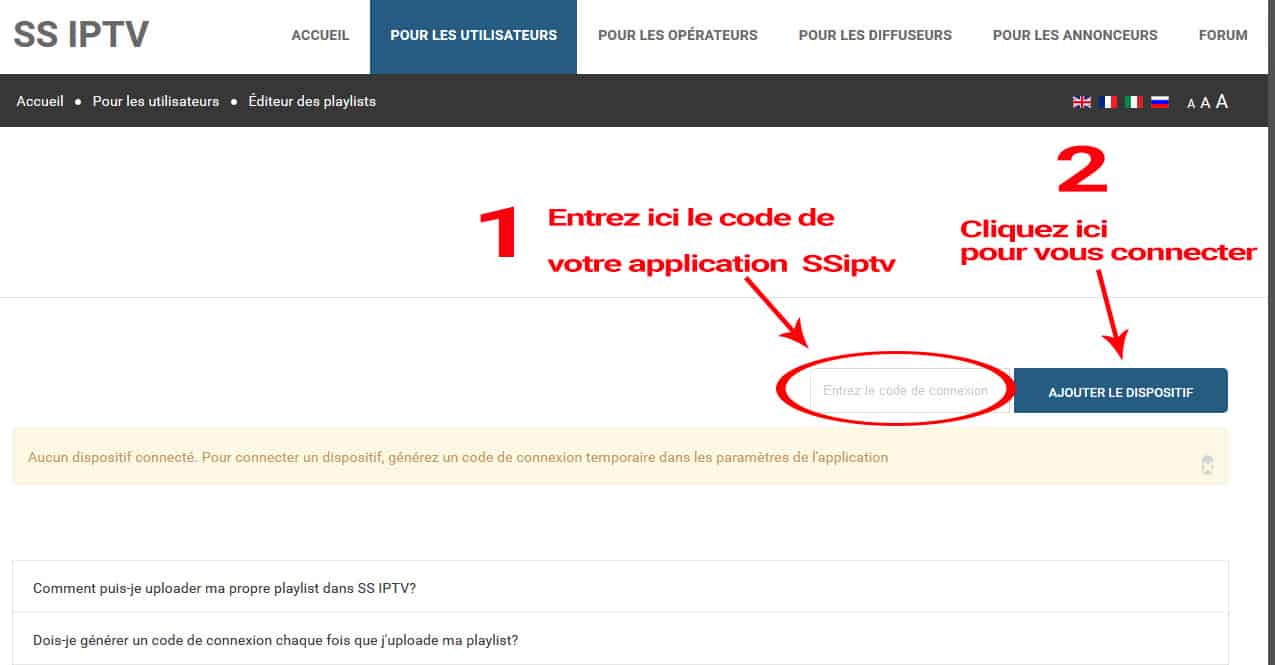
5- After connecting to your TV via the playlist editor, you just need to put the m3u link in » External Playlist », here is a short video that shows everything else to do:
https://www.youtube.com/watch?v=SHwEKV847Eo
[fusion_alert type= »success » accent_color= »#808080″ background_color= »#ffffff » border_size= » » icon= » » text_align= »left » text_transform= » » dismissable= » » box_shadow= »yes » hide_on_mobile= »small-visibility,medium-visibility,large-visibility » class= » » id= » » animation_type= »shake » animation_direction= »left » animation_speed= »0.3″ animation_offset= » »]
Need a high-quality IPTV subscription + remote installation on SSIPTV? click here
[/fusion_alert]