DISCLAIMER: WE ARE AN IPTV PROVIDER, WE DO NOT REPRESENT ANY APPLICATION DEVELOPERS / OWNER
For SAMSUNG & LG TV

Keep in mind that when you download according to these instructions, it is easier to do so from a computer; otherwise, there is online support that will be happy to assist you.
THE ROOM IPTV TEAM.
1. Download the SMART IPTV app on your TV from its app store.
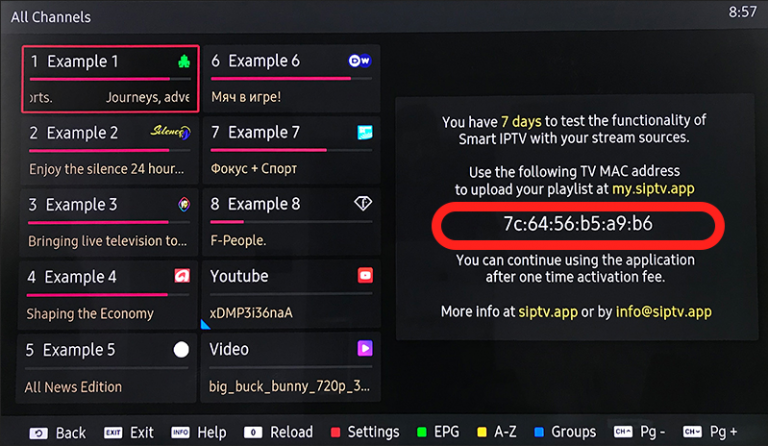
2. Install and open the app on your TV, and your MAC ADDRESS will appear on the first page of the SMART IPTV app. (your MAC Address is the part circled in red)
3. Then go to the SMART IPTV app website by clicking here.
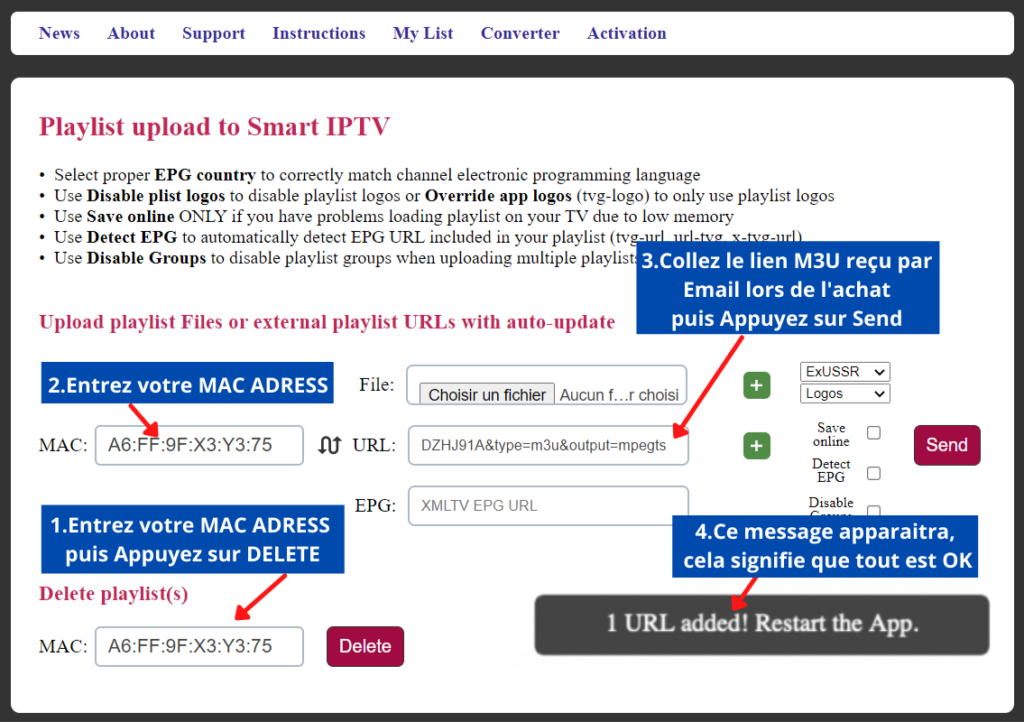
– Enter your MAC ADDRESS in the « Delete Playlist » box and click on « Delete« .
– Then enter your MAC ADDRESS in the « MAC » box.
– Paste your M3U link received by Email after your purchase on our site in the « URL » field.
– Click on the « Send » button.
The registration « 1 URL added! ! Restart the App » will appear at the bottom, so everything is ready to enjoy your ROOM IPTV Subscription and the TV Channels + VOD are on your TV.