The IPTV Extreme app is available on Google Play and on the app’s website as an APK.
This app is compatible with Android devices such as smartphones, Android boxes, and Android Smart TVs. The app is available in both free and paid versions, with the free version containing ads while the PRO version is ad-free!
The key features of IPTV Extreme are:
– Built-in player (advanced and lightweight)
– Chromecast support (beta)
– Parental control
– Remote control support
– Backup/restore settings
– M3U playlist support
– Multiple EPG (TV Guide) support
– Automatic EPG updates
– EPG alias management
– All EPG providers are included
– Support for Picons of various sizes
– Ability to download on-demand programs!
– Ability to record live streaming with a time limit!
– Over 10 themes available!
– Time recording
– Timer management
– Automatic startup function on boot
– Set memo function for events on the TV guide
– Search for similar events on the TV guide
– Sliding EPG time
How to Upload the m3u playlist or Xtream codes credentials on IPTV Extreme:
You can add your IPTV subscription playlist to IPTV Extreme via the following site: iptvextreme.eu
When you install the IPTV Extreme app, it will display the associated MAC address, then just follow these steps:
m3u Method:
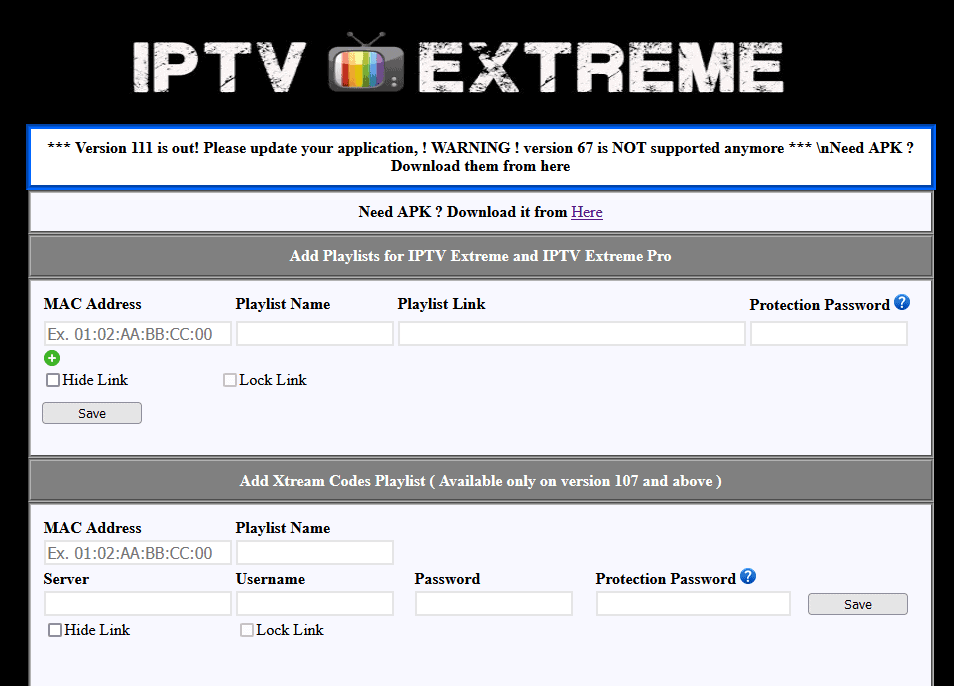
- Access the website and go to ‘Add playlists for IPTV’ and enter the MAC address in the ‘MAC address’ field.
- Name this playlist
- In the Playlist link, paste the m3u link of your IPTV subscription.
- You can protect your m3u list by creating a password in the ‘password’ Protection field
Xtream codes Method:
- On add Xtream Codes Playlist, enter the MAC address in the ‘MAC address’ field
- Name this playlist
- Enter the credentials for your Xtream codes IPTV subscription (Server URL + Username + Password)
- You can protect your m3u list by creating a password in the ‘password’ Protection field
If you have difficulties uploading your list, feel free to contact us or leave a comment below!
[fusion_content_boxes layout= »clean-horizontal » columns= »1″ link_type= »button » button_span= » » link_area= » » link_target= »_blank » icon_align= »left » animation_type= » » animation_direction= »left » animation_speed= »0.3″ animation_delay= » » animation_offset= » » hide_on_mobile= »small-visibility,medium-visibility,large-visibility » class= » » id= » » title_size= » » heading_size= »2″ title_color= » » body_color= » » backgroundcolor= » » icon= » » iconflip= » » iconrotate= » » iconspin= »no » iconcolor= » » icon_circle= » » icon_circle_radius= » » circlecolor= » » circlebordersize= » » circlebordercolor= » » outercirclebordersize= » » outercirclebordercolor= » » icon_size= » » icon_hover_type= » » hover_accent_color= » » image= » » image_id= » » image_max_width= » » margin_top= » » margin_bottom= » »][fusion_content_box title= »Need an IPTV subscription for IPTV Extreme? » backgroundcolor= » » icon= »fa-arrow-right fas » iconflip= » » iconrotate= » » iconspin= » » iconcolor= » » circlecolor= » » circlebordersize= » » circlebordercolor= » » outercirclebordersize= » » outercirclebordercolor= » » image= » » image_id= » » image_max_width= » » link= »http://premium-canal.com/boutique/produit-abonnement-premiuml-iptv/ » linktext= »ORDER NOW » link_target= » » animation_type= » » animation_direction= »left » animation_speed= »0.3″ animation_offset= » »]
[/fusion_content_box][/fusion_content_boxes]