DNS Change Tutorial on iPhone / iPad

To bypass the blocking of IPTV servers on your iPhone / iPad by your Internet Service Provider, follow these steps:
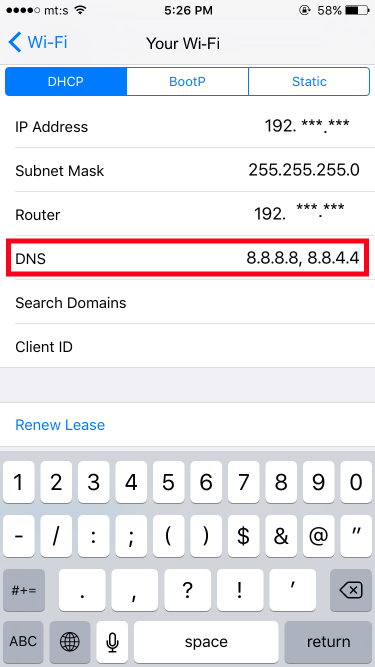
In this example, we will configure our iOS (iPhone, iPad, etc.) to use the DNS servers (8.8.8.8 and 8.8.4.4). Note that this can only be done if you are using a WiFi connection.
- Go to Settings on your iOS and navigate to WiFi Settings.
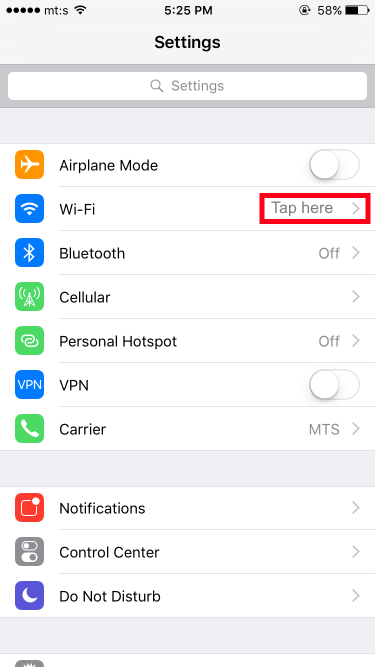
2. Select the WIFI / WLAN network you are connected to and tap on the blue « i » on the side.

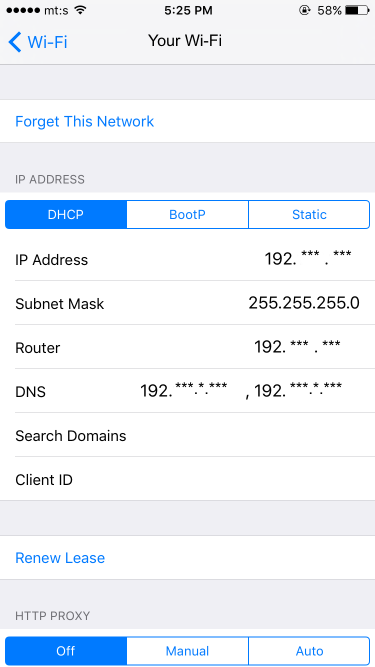
3. Change the DNS settings by tapping on the « DNS » line.
4. In the DNS field, enter 8.8.8.8, 8.8.4.4 (The comma and space are very important)
5. Go back to the previous screen, then return to the home screen.
Leading premium IPTV service for HD/4K streaming. + 25,000 channels, movies, and series.